Serial to Ethernet
UART x1, up to 230 kbps



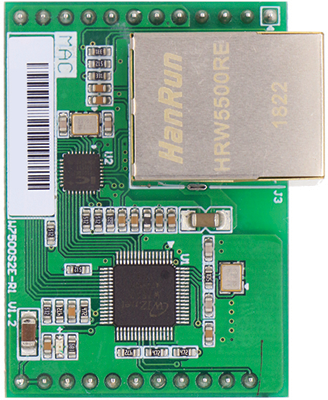
W7500S2E-R1 is low price Serial to Ethernet Module based on W7500 from WIZnet

UART x1, up to 230 kbps

IEEE 802.3/802.3u

Operation Environmental


Supports TCP server, TCP client, and UDP mode
Supports Modbus for industrial use

Configured via Command and Configuration Tool
Supports debug logging, serial command switching, data packing, timers, and secure TCP options
This section provides key documentation, including user manuals and datasheets, to help you understand product features, specifications, and usage.
| Name | Description | Notes | |
|---|---|---|---|
| User's Manual | Product usage instructions | EN |
EN 
|
| Datasheet | Technical specifications | - |
This section provides essential guides and manuals for setting up and configuring your device.Learn how to use various tools and interfaces—including command manuals, configuration utilities, web-based setup, and CLI tutorials—to efficiently manage and customize your product.
This section offers essential guides to help you get started, troubleshoot issues, and make the most of your device. Find setup instructions, developer resources, and support materials below.
| Name | Description | Notes |
|---|---|---|
| Getting Started | Quick setup instructions for using your WIZ750SR device | - |
| Trouble Shooting Guide | Solutions to common issues and troubleshooting steps | - |
| Developer's Guide | Setup, customization, and advanced usage for developers | - |

This section provides essential software resources, including configuration tools, firmware, and source code for your device.
This section provides essential hardware resources, including schematics, 3D models, and part lists for your reference.
W7500S2E-R1


© 2026. WIZnet Co., Ltd. All Rights Reserved.


Find WIZnet products like the W5500, W5100S, W6100, and new ioNIC series chips. Enter product names, model numbers, or keywords to explore our range of networking solutions. Start your search now!


 Datasheet
 Docs
Docs Store
Store Subscribe Newsletter